
The comeback of PKI smart cards – Modern authentication is looking back to move forward
Smart cards implementing Public Key Infrastructure (PKI) have been around since the 1990s. They protect a user’s private key and perform cryptographic operations securely on-card. But with so many modern authentication methods available, why should organizations consider PKI smart cards today?
What is PKI?
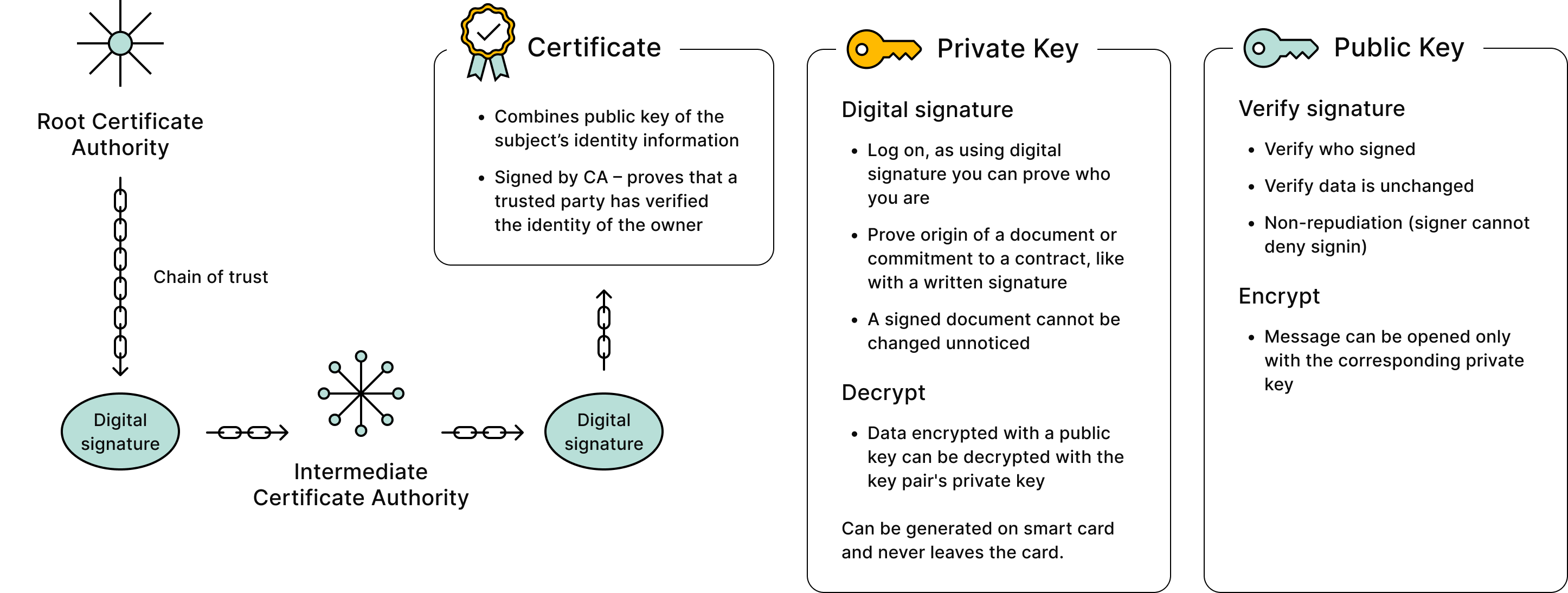
Public Key Infrastructure (PKI) is a framework of technologies, policies, and procedures used to securely manage digital keys and certificates. It enables the creation, distribution, verification, and revocation of digital identities.
PKI is essential for ensuring secure communication using digital signatures, and encryption across users, devices, and services. It helps establish trust, protect sensitive data, control access, and support regulatory compliance: making it a foundational element in secure digital ecosystems such as e-commerce, cloud services, and the Internet of Things (IoT).
The early struggles of PKI smart cards
Despite their potential, PKI smart cards never achieved widespread popularity. Deploying smart card login required multiple components: a Certification Authority (CA), smart card readers, middleware, and processes for card personalization and distribution.
Many vendors failed to deliver complete solutions. Middleware was buggy, CA systems were expensive and complex, and end-user experience was poor. For most organizations, especially those without top-tier security needs, the simpler username-password combo felt “good enough.”
Rising threats and the growing need for stronger authentication
Today, the landscape has changed. Sensitive data increasingly lives in cloud environments, making strong authentication critical. Username and password alone are no longer an option.
Without Multi-Factor Authentication (MFA), a single successful phishing attempt can compromise entire systems like Office365 or Teams. While some phishing attacks are obvious, others are highly targeted and convincing. It may take just one hurried moment for an employee to fall for one.
Why smart cards offer superior key protection
Authenticator apps like Microsoft Authenticator or Google Authenticator offer better security than passwords alone. However, if your organization requires high-assurance authentication, smart cards provide some advantages.
Smartphones with hardware Secure Elements are hard to compromise. Still, smart cards generally offer higher level protection of private keys. Extracting private keys from smart cards is extremely difficult – even with advanced techniques.
Controlled security standards: why hardware choice matters
Smartphone models come and go. It’s hard to control what Secure Elements your staff uses—if any. Smart cards offer consistency. You choose the card model, and stick with it across devices and years.
Smart cards come with robust documentation, standards (e.g. ISO 7816-X, PIV), and security certifications like Common Criteria and FIPS. You don’t always know what TPM or SE your smartphones and laptops are running—but you do with smart cards.
What about Windows Hello for Business?
Windows Hello for Business is effectively a form of virtual smart card—it stores key pairs in a Trusted Platform Module (TPM). While it’s convenient and reasonably secure, it does have a downside: if someone gets access to your machine and knows your PIN, they can log in.
Smart cards provide physical separation. If your card is stored in your wallet and not plugged in, the attacker can’t log in, even with your PIN.
Modern smart card UX: surprisingly smooth
Historically, users complained about smart card login being slow or buggy. But things have changed. Compared to MFA apps, smart cards can offer a smoother experience:
Login with username & password + authenticator:
1. enter username and password
2. phone out
3. PIN entry
4. app open (another PIN entry may be needed)
5. enter code from screen
Login with smart card:
1. insert card
2. enter PIN
That’s it!
Once authenticated, you don’t need to re-enter your PIN. Smart cards unify authentication across Windows login, VPN, and cloud services—offering true built-in two-factor authentication with minimal friction.
Smart card deployment: easier than ever
Still worried about complexity? It’s no longer a major hurdle:
- You may already have a CA solution running, as many organizations run Microsoft Certificate Services. Adding smart card certificate templates is easy and well-documented.
- Middleware? Most features are built-in into operating systems. Just install a minidriver or use PIV-compatible cards. Windows comes with a built-in PIV minidriver.
- On Windows, user interfaces are integrated out-of-the-box. OS X and Linux aren’t much harder either. OpenSC middleware/toolkit is a good choice in these environments.
For small to mid-sized organizations, tools like MyEID Minidriver Utility and Windows MMC handle card personalization. For large-scale deployments, tools like Aventra APM integrate with HR and IDM systems. Many tools are vendor-independent thanks to open standards.
Final thoughts: a secure, scalable MFA alternative
As attackers develop MFA bypass techniques and adversary-in-the-middle attacks, PKI smart cards are a modern, robust option for organizations needing more than app-based authentication.
They offer:
- Hardware-backed private key protection
- Unified 2FA login across environment – same authentication method can be used to log on to your workstation and for example to Entra-ID enabled cloud services.
- Encryption and digital signing functionality
- Option to include a visual ID and an access control ID (e.g. MIFARE DESFire) on the same smart card.
- Easy integration with modern OS and enterprise tools
If security matters—and it probably does—it’s time to give PKI smart cards another look.
Aventra Oy offers PKI smart cards that meet even the highest security requirements. Whether you’re a small organization or an enterprise with demanding compliance standards, we provide scalable solutions backed by trusted cryptographic hardware.